
Spatial Manager: Move geodata intelligently

The Spatial Manager is excellent for importing blocks with attribute data.

Spatial Manager™ for BricsCAD is a powerful BricsCAD plug-in for BricsCAD users who need to import, export, transform, and manage spatial geodata in a simple, fast, and cost-effective manner. This includes many features that were previously not available in BricsCAD.

Functions Spatial Manager

Click on the tab titles to learn more

Functions Spatial Manager

Click on the tab titles to learn more

Functions Spatial Manager

Click on the tab titles to learn more

Data Import

Data export

Coordinates

Background maps

Thematic Maps

Data Management

Google Street

Google Earth

Field Calculator

Data Grid

Data Import

Imports spatial data into new or existing BricsCAD drawings as BricsCAD objects and Extended Entity Data (EED)

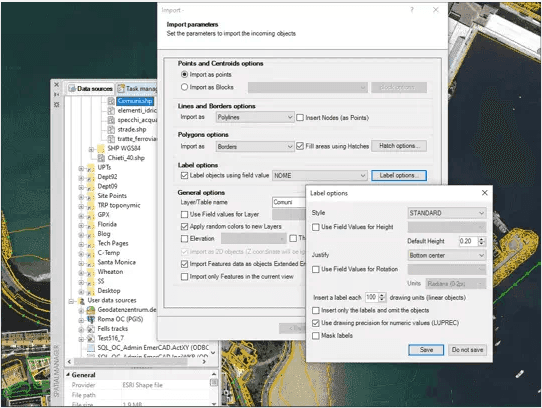
Spatial Manager™ for BricsCAD imports geodata into new or existing BricsCAD drawings as BricsCAD objects and Extended Entity Data (EED) using a powerful wizard, allowing the user to select all necessary import parameters to obtain differentiated geo-information in a CAD drawing. Batch import, automatic layering, filling polygons, blocks by data values and associated attributes, labeling, height, thickness, or geo-filters are just some of the app features when importing from geo-files, data servers, data stores, etc.

Data Import

Data export

Coordinates

Background maps

Thematic Maps

Data Management

Google Street

Google Earth

Field Calculator

Data Grid

Data Import

Imports spatial data into new or existing BricsCAD drawings as BricsCAD objects and Extended Entity Data (EED)

Spatial Manager™ for BricsCAD imports geodata into new or existing BricsCAD drawings as BricsCAD objects and Extended Entity Data (EED) using a powerful wizard, allowing the user to select all necessary import parameters to obtain differentiated geo-information in a CAD drawing. Batch import, automatic layering, filling polygons, blocks by data values and associated attributes, labeling, height, thickness, or geo-filters are just some of the app features when importing from geo-files, data servers, data stores, etc.

Data Import

Data export

Coordinates

Background maps

Thematic Maps

Data Management

Google Street

Google Earth

Field Calculator

Data Grid

Data Import

Imports spatial data into new or existing BricsCAD drawings as BricsCAD objects and Extended Entity Data (EED)

Spatial Manager™ for BricsCAD imports geodata into new or existing BricsCAD drawings as BricsCAD objects and Extended Entity Data (EED) using a powerful wizard, allowing the user to select all necessary import parameters to obtain differentiated geo-information in a CAD drawing. Batch import, automatic layering, filling polygons, blocks by data values and associated attributes, labeling, height, thickness, or geo-filters are just some of the app features when importing from geo-files, data servers, data stores, etc.

Connect data. Control geodata. Space intelligent.

Easily manage geodata smartly control spatial data

Spatial Manager™ for BricsCAD is a powerful BricsCAD plug-in for BricsCAD users who need to import, export, transform, and manage spatial geodata in a simple, fast, and cost-effective manner. This includes many features that were previously not available in BricsCAD.

Connect data. Control geodata. Space intelligent.

Easily manage geodata smartly control spatial data

Spatial Manager™ for BricsCAD is a powerful BricsCAD plug-in for BricsCAD users who need to import, export, transform, and manage spatial geodata in a simple, fast, and cost-effective manner. This includes many features that were previously not available in BricsCAD.

Connect data. Control geodata. Space intelligent.

Easily manage geodata smartly control spatial data

Spatial Manager™ for BricsCAD is a powerful BricsCAD plug-in for BricsCAD users who need to import, export, transform, and manage spatial geodata in a simple, fast, and cost-effective manner. This includes many features that were previously not available in BricsCAD.

Versatile Data Import

Import geodata from over 25 file formats, databases, and web services – including automatic coordinate transformation.

Versatile Data Import

Import geodata from over 25 file formats, databases, and web services – including automatic coordinate transformation.

Versatile Data Import

Import geodata from over 25 file formats, databases, and web services – including automatic coordinate transformation.

High-performance data export

Export CAD geometries along with attributes into common GIS formats such as SHP, KML, GML, or GeoPackage – for seamless further processing.

High-performance data export

Export CAD geometries along with attributes into common GIS formats such as SHP, KML, GML, or GeoPackage – for seamless further processing.

High-performance data export

Export CAD geometries along with attributes into common GIS formats such as SHP, KML, GML, or GeoPackage – for seamless further processing.

Attribute and Layer Management

Edit, filter, and manage object data directly in BricsCAD – quickly, intuitively, and structured.

Attribute and Layer Management

Edit, filter, and manage object data directly in BricsCAD – quickly, intuitively, and structured.

Attribute and Layer Management

Edit, filter, and manage object data directly in BricsCAD – quickly, intuitively, and structured.

Interactive background maps

Use online mapping services like OpenStreetMap, Bing, or Google Maps as a visual reference directly in the drawing area.


Interactive background maps

Use online mapping services like OpenStreetMap, Bing, or Google Maps as a visual reference directly in the drawing area.

Interactive background maps

Use online mapping services like OpenStreetMap, Bing, or Google Maps as a visual reference directly in the drawing area.

Your No. 1 CAD partner in Germany

Let us find the ideal CAD package for you - start now!

With our CAD experts, you're guaranteed to find the right solution – and always receive first-class support.

Your No. 1 CAD partner in Germany

Let us find the ideal CAD package for you - start now!

With our CAD experts, you're guaranteed to find the right solution – and always receive first-class support.

Your No. 1 CAD partner in Germany

Let us find the ideal CAD package for you - start now!

With our CAD experts, you're guaranteed to find the right solution – and always receive first-class support.

Germany's No. 1 CAD partner

What our previous (and current) customers say about us

Optimize your design processes, increase efficiency, and reduce costs with our CAD software solutions, support, and training.

Germany's No. 1 CAD partner

What our previous (and current) customers say about us

Optimize your design processes, increase efficiency, and reduce costs with our CAD software solutions, support, and training.

Germany's No. 1 CAD partner

What our previous (and current) customers say about us

Optimize your design processes, increase efficiency, and reduce costs with our CAD software solutions, support, and training.


Thorsten Seifert

CADprofi offers an appropriate price/performance ratio and stable software.


Thorsten Seifert

CADprofi is a must for construction professionals who work with CAD 2D.


Thorsten Seifert

For me, the most important thing is that in the application it is identical, so it is very good, like significantly more expensive software. It's fun to work with.


Thorsten Seifert

CADprofi is a useful and robust program with many features and possibilities. It is worth investing in the program and learning it, because in-depth knowledge pays off very quickly and makes the work more pleasant.


Thorsten Seifert

CADprofi is a very good program.


Thorsten Seifert

Thank you for your professional service.


Thorsten Seifert

With the help of CADprofi, you can complete your work efficiently and quickly. You save time and increase productivity. These are very good tools for any engineer.


Thorsten Seifert

CADprofi works without problems. The price positively affects the purchase of the program and the further use of software maintenance.


Thorsten Seifert

CADprofi is no different from other programs of this kind that are significantly more expensive. Recommended!


Thorsten Seifert

CADprofi is an addition to my work in planning electrical installations, which significantly reduces working time and enhances the visual impact of the submitted planning documents.

Contact us

Do you need advice, training, or support? Contact us via the form. We are here for you!

Optimize your design processes with BricsCAD, increase efficiency and reduce costs with our CAD software solutions.

Contact us

Do you need advice, training, or support? Contact us via the form. We are here for you!

Optimize your design processes with BricsCAD, increase efficiency and reduce costs with our CAD software solutions.

Contact us

Do you need advice, training, or support? Contact us via the form. We are here for you!

Optimize your design processes with BricsCAD, increase efficiency and reduce costs with our CAD software solutions.